Admin API overview
Each running mock server exposes an admin API that allows you to manage your environment. This API can be used to automate the management of your mock server, especially in a remote environment, without having to restart the application.
Admin API base endpoint
The admin API base endpoint is the same as the mock server URL with the /mockoon-admin path appended.
For example, if your mock server is running on http://localhost:3000, the admin API base endpoint will be http://localhost:3000/mockoon-admin.
💡 The API prefix is not applied to the admin API base endpoint. If your API endpoints are accessible on http://localhost:3000/myprefix/{endpoint}, the admin API base endpoint will still be http://localhost:3000/mockoon-admin.
Admin API authentication
The admin API is always protected by bearer token authentication. Every request must include an Authorization: Bearer <token> header (or, for the SSE events endpoint, a ?token=<token> query parameter). Requests without a valid token receive a 401 Unauthorized response.
Authentication in the desktop application
In the desktop application, a secure random token is generated on each application launch and is available from each mock API Settings tab:
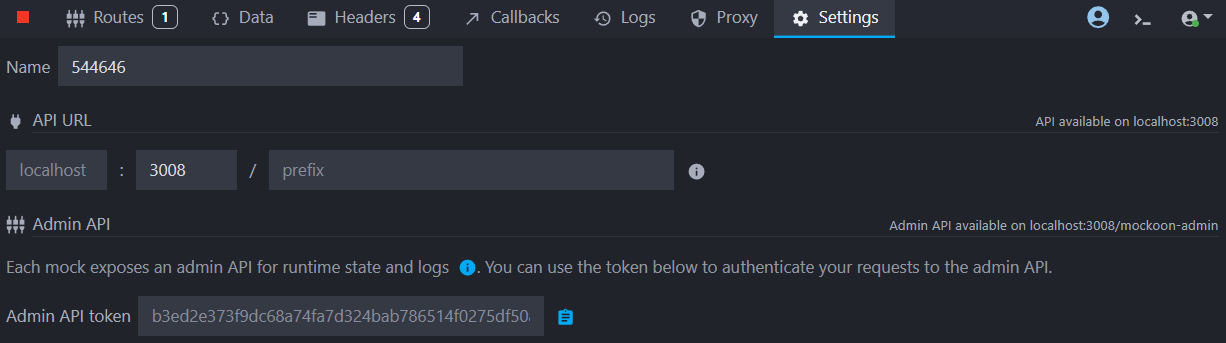
The token can be overridden by setting the MOCKOON_ADMIN_API_TOKEN environment variable before launching the application. This token will apply to all mock's admin APIs running in the desktop application.
Authentication in the CLI
In the CLI, you can either provide your own token or let Mockoon generate one for you. When no token is provided, a secure random token is generated at startup and printed to the logs once. Make sure to save it, as it will change every time the server restarts.
Use the --admin-api-token flag, or the MOCKOON_ADMIN_API_TOKEN environment variable.
Copymockoon-cli start --admin-api-token mytoken -d ./mock.json
You can also provide one token per environment by passing the flag multiple times (or as a comma-separated list), in the same order as the --data files.
Learn more about the CLI in the dedicated documentation
Cross-origin requests (CORS)
By default, the admin API emits no CORS headers. To allow a specific frontend origin, use the --admin-api-cors-origin flag (or MOCKOON_ADMIN_API_CORS_ORIGIN) on the CLI.
Admin APIs from local mocks running in the desktop application cannot be configured to allow CORS requests.
Disable the admin API
The admin API is enabled by default.
In the desktop application, the admin API cannot be disabled. However, you can disable it when running your mock with the CLI or the serverless library.
Disable the admin API with the CLI
To disable the admin API when running your mock with the CLI, use the --disable-admin-api flag:
Copymockoon-cli start --disable-admin-api -d ./mock.json
📘 Check the CLI dedicated documentation
Disable the admin API with the serverless library
To disable the admin API when running your mock with the serverless library, set the enableAdminApi option to false when building the MockoonServerless instance:
Copyconst mockoonServerless = new mockoon.MockoonServerless(mockEnv, {
  enableAdminApi: false
});
📘 Check the serverless library dedicated documentation
Admin API capabilities
Currently, the admin API allows you to: