Routing
API prefix
In order to prefix all your mock API routes,
Open the Environment Settings by clicking on the tab at the top of the window:

Then, fill the API prefix input at the top of the environment Settings:
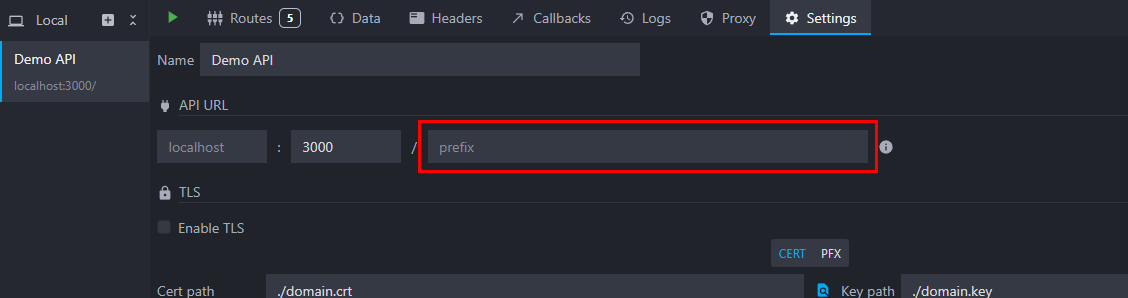
The prefix will appear under your environment name in the environments list. All your environment's routes will now be prefixed and available at the following address http://localhost:port/myprefix/myroute instead of http://localhost:port/myroute.
API routes
Mockoon uses Express to run the mock servers and path-to-regexp for route matching. In general, most of the Express/ path-to-regexp documentation apply. Please refer to the routing documentation for more information and examples on the following topics.
Routes order
Routes are registered in the same order as displayed in the application (inside folders or not). The first matching route takes precedence.
A route parameter captures any value for its URL segment. For example, /users/:id or /users/* can match /users/search. Put more specific routes (like /users/search) before generic routes. You can always reorder routes by dragging and dropping them.
Route patterns and parameters
Starting with v9.6.0, Mockoon is compatible with Express 5 route patterns while still supporting most of Express 4 syntaxes. A conversion is automatically applied to Express 4 patterns.

Among the supported syntaxes for route patterns or parameters, the following ones are available (includes both Express 4 and 5 syntaxes):
- Wildcards:
- Unnamed wildcard (Express 4):
/*/*(automatically converted to named ones with awildcardprefix and an incremental number suffix to avoid name conflicts. For example:/path/*becomes/path/*wildcard0and/path/*/nested/*becomes/path/*wildcard0/nested/*wildcard1). - Named wildcard (Express 5):
/*wildcard0/nested/*wildcard1.
- Unnamed wildcard (Express 4):
- Route parameters:
- Regular route parameters:
/:param1/:param2. - Optional route parameters:
/users/:id?(Express 4) or/users{/:id}(Express 5). Another example:/file/:name.:ext?(Express 4) or/file/:name{.:ext}(Express 5)
- Regular route parameters:
💡 You can retrieve the route parameters by using the {{urlParam 'paramName'}} templating helper.
- Optional groups: you can make a part of the route optional by wrapping it in parentheses, with or without an
?after it (Express 4), or by wrapping it in curly braces (Express 5). For example, wherecdis an optional part of the route:/ab(cd)?e,/ab(cd)e, or/ab{cd}e. - Optional characters: you can make a character optional by adding a
?after it (Express 4) or by wrapping it in curly braces (Express 5). For example, wherebis an optional character:/ab?c, or/a{b}c.
To use special characters such as (, ), [, ], ?, +, *, or :, you can escape them with a backslash. For example:
/path/\(literal\)/path/file\?/path/file\+
Query parameters
Routes must be declared without query parameters as they are not part of the route path. They can only be added to the request when calling an endpoint.
Query parameters can be retrieved with the queryParam and queryParamRaw helpers and are available in the response rules to check their content and serve different responses based on them.
Arrays and objects are supported in the query string. For more information, please refer to the query parameters documentation.
Temporarily disable a route
You can disable a route by clicking on the Toggle route entry in the route dropdown menu. The route will be marked with a red border and will not be accessible until you enable it again.
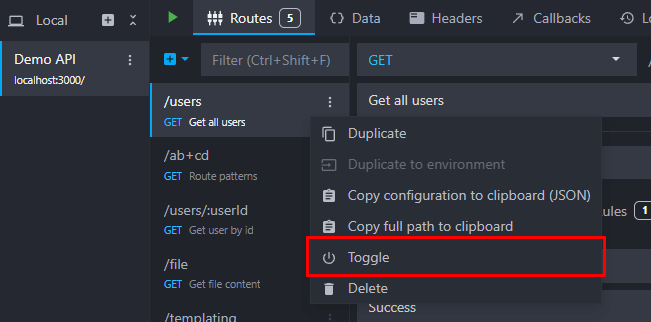
You can also disable all routes in a folder by using the Toggle direct child routes entry in the folder dropdown menu.
When running your mock API using the CLI, you can disable routes using the --disable-routes flag followed by a route UUID or keyword/name or a folder keyword/name: mockoon start -d ./data.json --disable-routes myroute folder2. You can also disable all routes by using a wildcard: mockoon start -d ./data.json --disable-routes "*".
When using the serverless package, you can disable routes using the disabledRoutes option.