Mockoon release v9.7.0
2026-06-18
Welcome to this new release of Mockoon. It brings many improvements, including a new multi-select mode, new metadata headers, and improvements to the callbacks chain. We also removed the telemetry from the desktop and web applications, which means that Mockoon no longer collects any usage data. Read on to learn more about this release.
Support us!
Mockoon is proudly independent and open-source, maintained without external funding. We rely on both sponsorships and Mockoon Cloud subscriptions to keep improving the project and building new features. A big thank you to the companies below for supporting our work and helping us grow (and all the sponsors who helped this project over time!):

|

|

|
If you'd like to support Mockoon as well, you can become a sponsor or subscribe to Mockoon Cloud. Every contribution helps keep the project alive and evolving. Thank you!

|

|
Goobye telemetry!
As announced last month, we removed the telemetry from the desktop and web applications. This means that Mockoon desktop and web no longer collects any usage data. All the past data collected was deleted and the collection stopped on May, 6th. We removed the interface elements related to telemetry in this release.
We also made changes to the remote configuration so the endpoint is only called when the user explicitly log in to the Cloud. This means that the application will no longer call endpoints when the user is not logged in.
We are proud to be one of the few open-source projects that respect your privacy and don't collect any data about you or your usage of the application.
The CLI and Docker image were never collecting any telemetry data, so no changes were made to them.
Multi-select mode
We added a new multi-select mode to the routes, data buckets and callbacks lists. You can now select multiple items and perform actions on them, such as duplicate or delete:
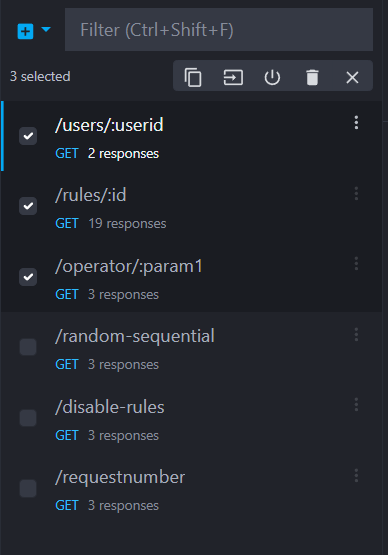
To trigger the multi-select mode, simply ctrl/cmd + click on the items you want to select. You can also use shift + click to select a range of items.
(Issue #1059)
Admin API hardening
In this release, the Admin API security model was hardened across desktop and CLI.
Each running mock's admin API (accessible at /mockoon-admin/) now requires a secure token for authentication. This token is auto-generated at runtime and can be found in the desktop app or provided via CLI options. This change prevents unauthorized access to the Admin API, which could lead to data loss or security breaches if left unprotected.
In the desktop application, the admin token can be copied from the environment Settings tab when the environment is running:

In the CLI, you can provide a token with --admin-api-token or MOCKOON_ADMIN_API_TOKEN. If no token is provided, the CLI auto-generates a secure token at runtime.
Read more about the admin API authentication in the documentation.
Among other changes, the admin API now emits no CORS headers by default, which prevents browser-based connections from unauthorized UIs unless CORS is explicitly allowed.
For safer observability, known-sensitive values (including authorization headers) are now redacted in transaction logs and runtime outputs (stdout and file logs). The desktop app Logs tab keeps the full details for local debugging.
Finally, we fixed environment variable updates through the admin API so prefix handling is now correctly applied when updating variables, preventing accidental overwrite of unrelated environment variables.
These updates were part of a vulnerability disclosure. We recommend to update to this version as soon as possible if you are using the admin API.
(PR #2254)
New metadata headers
Three new metadata headers are now automatically added to the responses to help you identify which route and response served the request, e.g.: X-Mockoon-Route-Uuid: 299e1663-725c-475d-8d67-f0f104406805.
This option is always enabled in the desktop application but disabled by default when self-hosting with the CLI or Docker image. You can enable it by setting the --enable-route-metadata-headers flag when starting the CLI.
You can find more information about these headers in the documentation.
(Issue #1837)
Cloud environments offline editing
We removed the ability to edit Cloud environments when offline. A banner will now be displayed to inform the user that the environment is read-only until they go back online:

With the current implementation of the synchronization server, it is not possible to properly handle conflicts when editing an environment offline and then going back online, as it could easily lead to data loss. We think it's an acceptable trade-off to keep the synchronization server simple and reliable, especially with the self-hosting plans we have for the future.
(Issue #2221)
Callbacks chain improvements
In v9.5.0, we introduced a small protection to prevent infinite loops when calling, or chaining, callbacks. However, after analyzing the feedback we received, we realized that this protection was too strict and could prevent valid use cases.
We changed the implementation (from a X-Mockoon-Callback-Chain header to a X-Mockoon-Callback-Depth header) to allow more flexibility while still preventing infinite loops. Instead of blocking the execution of a callback when it is already in the call stack, we now allow a maximum of recursive or cyclic callbacks to be executed. The default maximum depth is 100, but you can change it using the CLI flag --max-callback-depth.
(Issue #2174)
Improvements
- The AUR package now supports the arm64/aarch64 architecture. (PR #2190)
- The OpenAPI parser now correctly handles booleans in
examples. (Issue #2159)
Fixes
- We updated electron-builder to the latest version which should finally fix the Snap wayland compatibility issue. (PR #2252 and issue #1909)
- Fixed a bug where the "duplicate to environment" were not propagated to the Cloud sync server. (Issue #2237)
- Fixed the e2e tests broken after CI workflow update to the latest Node.js version. (Issue #2231)
- A path traversal vulnerability was fixed allowing access to unauthorized files in folders starting with a similar name, or in Docker containers. We recommend updating to this version as soon as possible if you are using templating helpers in file paths with user-provided values (query parameters, request body, etc.). (PR #2255)
Chores
- We fully migrated the application to Angular's control flow. (PR #2233)
- Node.js v26 was added to some of the CI workflow tests. (PR #2236)
- Debugging of the application's remote process was fixed. (PR #2251)
- The official Docker image's base was updated to node:26-alpine to fix several vulnerabilities. (PR #2252)
- We updated the libraries and application dependencies to their latest versions to fix several vulnerabilities and reduce the number of dependencies we use. We also migrated the application main process build from Webpack to ESbuild. (PR #2252)
Thank you
A big thank you to the following people who helped to make Mockoon better:
- @akamike: OpenAPI parser fix for booleans in examples.
- @Brian-code-123: New metadata headers implementation.
- @Spissable: AUR package arm64 support.