Mockoon release v9.10.0
2026-10-30
Welcome to this new release of Mockoon. Version 9.10.0 marks the general availability of Mockoon Pro and introduces workspace access rights for multiple teams, mixed authentication, automatic major-version migrations, improved refreshed notifications, and several fixes. Read on to learn more about this release.
Support us!
Mockoon is proudly independent and open-source, maintained without external funding. We rely on both sponsorships and Mockoon Pro subscriptions to keep improving the project and building new features. A big thank you to the companies below for supporting our work and helping us grow (and all the sponsors who helped this project over time!):

|

|

|
If you'd like to support Mockoon as well, you can become a sponsor or subscribe to Mockoon Pro. Every contribution helps keep the project alive and evolving. Thank you!

|

|
Mockoon Pro general availability and workspaces
After a public beta period, Mockoon Pro is now generally available. It brings real-time collaboration, remote mock API deployments, an embedded web application, enterprise authentication, and administration tools to your own infrastructure. Check out the self-hosting documentation to get started.
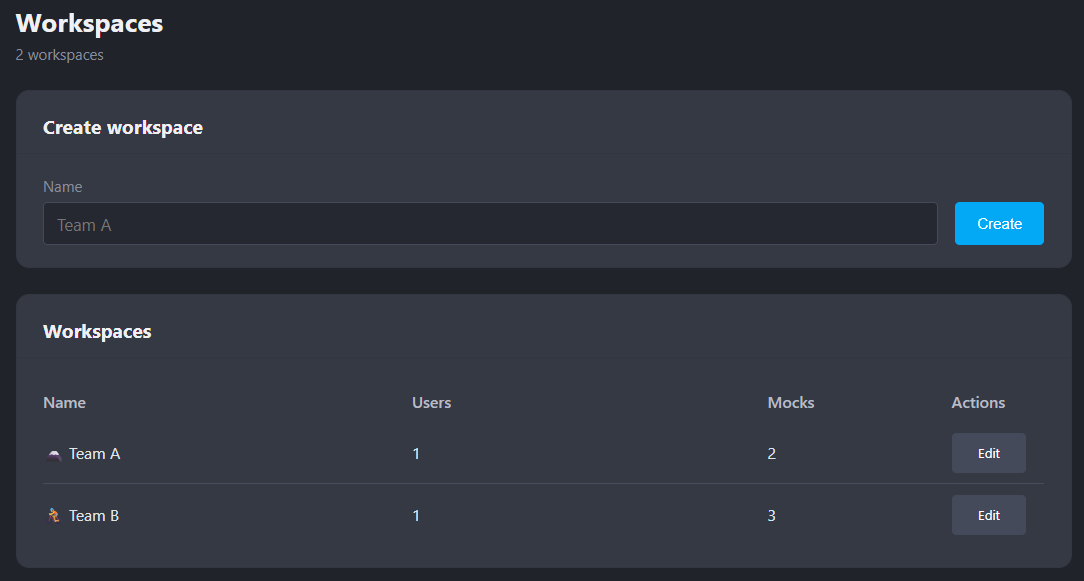
And starting with this release, Mockoon Pro now includes workspaces, allowing organizations to separate remote mock APIs between multiple teams or projects and manage who can access each group of resources.
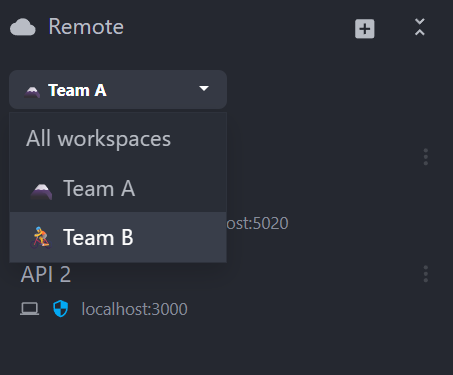
Users can only see, edit, synchronize, and deploy environments from the workspaces they are assigned to, and can belong to multiple workspaces if granted access.
Existing Mockoon Pro installations are migrated automatically: a Default workspace is created once and existing remote environments and non-Owner users are assigned to it. Learn more in the workspaces and team access documentation.
(Issue #2418)
Other Mockoon Pro improvements
-
Mockoon Pro now supports a mixed authentication mode, allowing local database accounts with username and password to coexist with OpenID Connect (OIDC) Single Sign-On. Organizations can progressively adopt SSO while retaining local access for selected users or administrators. Learn more in the authentication documentation.
-
Owners can now change team members' roles between User and Owner from the administration portal. Safeguards prevent users from changing their own role, demoting the last Owner, or changing the role of a disabled account. Role changes are recorded in the audit trail.
-
Mockoon Pro now performs automatic synchronized-environment migrations during major-version upgrades. When a newer major server version starts, persisted remote environments are migrated centrally before clients connect. Desktop clients must use the same major version as the server, while the embedded web application is updated with it. Learn more in the migration documentation.
-
Updates made to the Pro instance settings are now logged and tracked in the audit trail, providing better visibility and accountability for configuration changes.
Restore deleted entities from notifications
Deleted routes, folders, route responses, data buckets, and callbacks can now be restored directly from the notification using the new Undo action. Restored entities return to their original position when possible, and a progress bar shows how long the action remains available.

(Issue #2362)
Security
- The CLI now provides a new
--proxy-verify-tlsflag to validate TLS certificates when proxying requests to HTTPS APIs. Validation remains disabled by default for backward compatibility, while the application now displays a warning when an HTTPS proxy target is used without certificate validation. Enable this option when forwarding sensitive data or connecting over untrusted networks. (PR #2435)
Improvements
-
Application notifications have a new, more modern design. Toasts now use a neutral background, a clear border, a colored status accent, and an icon, making success, warning, and error messages easier to identify without overwhelming the interface. (Issue #2415)
-
The application terminology and connection flow have been updated for Mockoon Pro. Cloud environments are now called Remote environments, the desktop application displays Local and Remote sections, and the web application uses a single APIs list. The previous sign-in action is now Connect, allowing users to choose between an organization's private Mockoon Pro instance and the legacy Mockoon Cloud service. Messages related to subscriptions, self-hosting, and disconnections have also been clarified. (Issue #2369)
Fixes
-
Fixed an issue where switching the desktop application from the legacy Mockoon Cloud service to a self-hosted Mockoon Pro instance could leave synchronization connected to the previous API URL. Authentication now uses the newly configured instance and no longer retries indefinitely after an unauthorized response. (Issue #2405)
-
Fixed a synchronization propagation issue when a remote environment was deleted or converted to local after receiving an environment-list update. The resulting local removal is no longer sent back to the synchronization server, preventing incorrect follow-up events and stale team presence indicators. (PR #2417)
Chores
- Updated dependencies across the desktop and web applications, CLI, libraries, backend services, and Docker images to their latest compatible versions.
Thank you
A big thank you to the following people who helped to make Mockoon better:
- @rohanakode490: Undo action for deleted entity notifications.