Initial setup
When launching Mockoon Self-Hosted for the first time, an interactive Setup Wizard guides you through creating the initial administrator account and activating your license.
Setup wizard
On its first start, Mockoon Self-Hosted automatically redirects browser traffic to /setup.
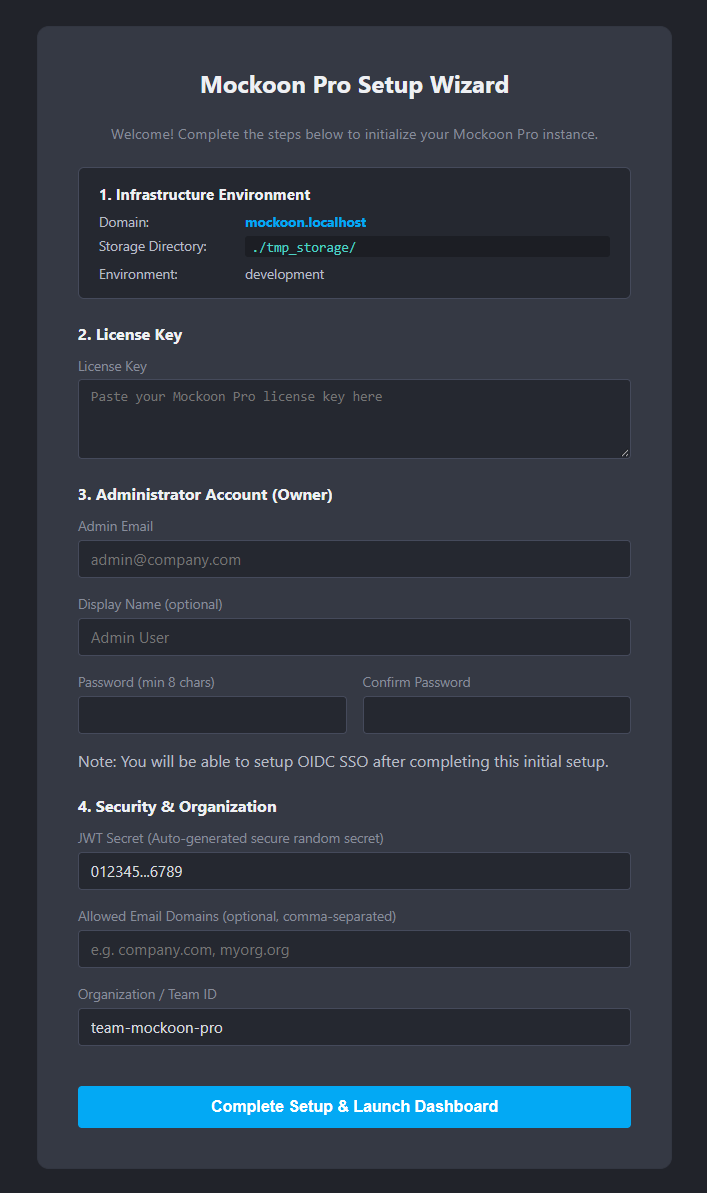
Configuration fields
- Infrastructure preview: Displays the active base domain (
MOCKOON_DOMAIN), storage directory, and runtime mode. - License key: Your signed license key (see Licensing to learn more).
- Administrator account (Owner): Admin email, optional display name, and password (minimum 8 characters) for local dashboard access. You will be able to set up OpenID Connect (OIDC) Single Sign-On later if needed.
- Security & organization: Generated JWT secret (auto-generated), optional allowed email domain restrictions, and your organization identifier (defaults to
team-mockoon-pro).
Completing the setup
The setup process initializes your configuration, creates the administrator account, and activates your license key.
Upon completion, you are logged in as the team Owner and redirected to the Dashboard (/dashboard).