API mock deployments
Mockoon Pro allows you to deploy your mock APIs to your Mockoon Pro instance and share them with your team, clients, or class. This feature is available in the desktop application and is part of the Mockoon Pro paid plans. Read on to learn how to use it and the different features it offers.
Managing your deployments
Deploy an environment
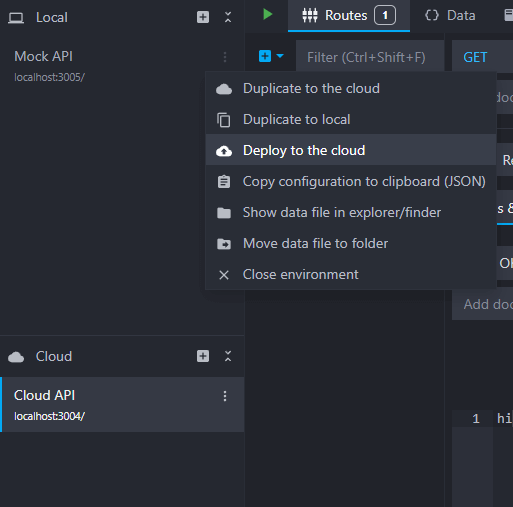
You can deploy an environment to your Mockoon Pro instance using the context menu in the local or cloud environments list and selecting "Deploy to the cloud":
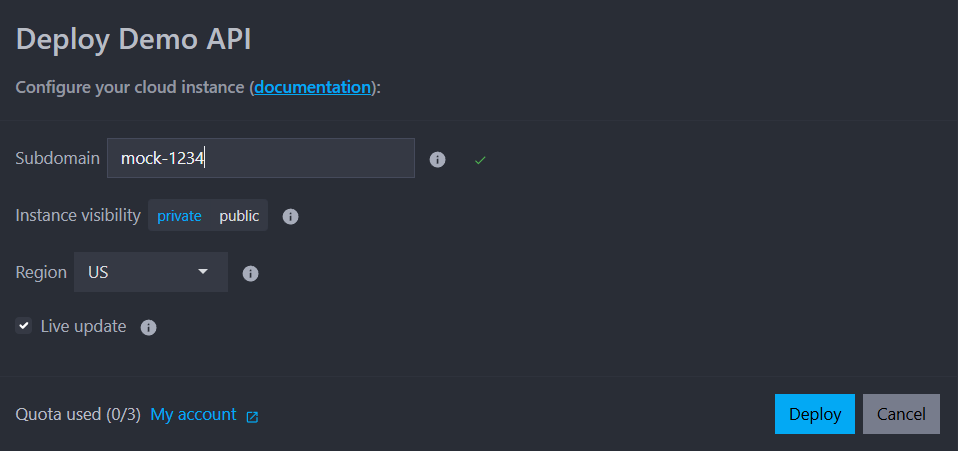
In the deployment dialog, you can further customize your instance:
- Subdomain: The default subdomain is generated automatically, but you can customize it to a unique value. The subdomain will be part of the instance URL (e.g.
https://{subdomain}.{serverId}.mockoon.app). - Visibility:
- Public: The environment will be accessible to anyone with the URL.
- Private: The environment will be accessible only to users with the URL and the API key (see Instance URL and visibility below).
- Live updates: If enabled, changes made to the environment will be pushed to the remote instance automatically without requiring a manual re-deployment. If disabled, changes will only be applied to the remote instance when you manually re-deploy it (see Live updates and re-deployments for more information).
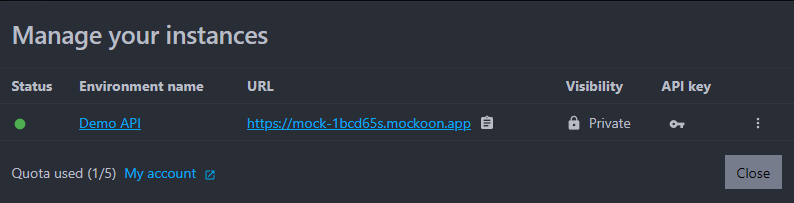
After clicking the "Deploy" button, the environment will be deployed on your Mockoon Pro instance and will be accessible using the provided URL. In the management dialog, you can find the URL and the API key to access the environment. You can also re-deploy the environment or delete the instance:
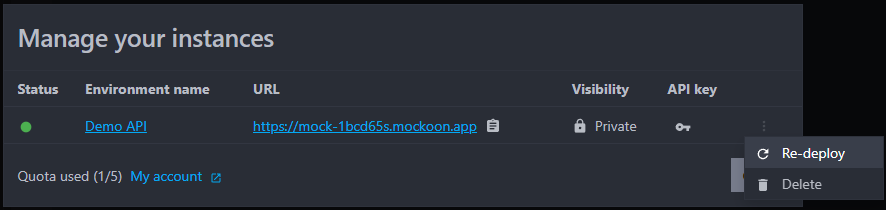
Re-deploy or delete an instance
In the management dialog, you can re-deploy the environment or delete the instance using the menu:
Live updates and re-deployments
If you enabled the Live updates option when deploying the environment, changes made to the environment will be pushed to your Mockoon Pro instance automatically without requiring a manual re-deployment. This allows you to see the changes reflected in the running instance nearly in real-time. Behind the scenes, the application pushed the necessary changes to your Mockoon Pro instance using the Admin API within a short delay.
Instance URL and visibility
The instance will be deployed inside your Mockoon Pro instance and will be accessible using a unique URL in the form of https://mock-abcd1234.mockoon.company.com (where mockoon.company.com is your Mockoon Pro instance domain). The URL will be displayed in the management dialog and can be shared with your team, clients, or class. You can also customize the subdomain part of the URL when deploying the environment.
The visibility of the environment can be set to public or private. Here are the differences between the two:
- Public: The environment is accessible to anyone with the URL. The API key is displayed in the management dialog and must be included in the request
Authorizationheader to access the environment's admin API. - Private: The environment is accessible only to users with the URL and the API key. The API key is displayed in the management dialog and must be included in the request
Authorizationheader to access the environment.
Unsupported features
The deployment feature does not support the following features:
- Custom TLS and hostnames are not supported and will be disabled in the cloud environment.
- External files linked to the environment are not uploaded and served (e.g. environment's certificates or files used in the "File" response body type). File serving is generally not supported in remote environments and linking files is disabled.
- The proxy mode will be disabled if it points to a local address or IP (e.g.
localhostor127.0.0.1). - Callbacks pointing to a local address or IP (e.g.
localhostor127.0.0.1) will be disabled.
Headers
When your environment is deployed, Mockoon adds the following special headers to the responses:
X-Mockoon-Callback-Depth: header tracking the depth of callback calls to prevent infinite loops (see Infinite callbacks loop prevention).