Mockoon release v9.5.0
2026-01-13
Welcome to this new release of Mockoon. It brings many improvements among which: CLI self-hosting for cloud environments, relative URL support in callbacks, curl command copying from logs, and more. Read on to learn more about this release.
Support us!
Mockoon is proudly independent and open-source, maintained without external funding. We rely on both sponsorships and Mockoon Cloud subscriptions to keep improving the project and building new features. A big thank you to the companies below for supporting our work and helping us grow (and all the sponsors who helped this project over time!):




If you'd like to support Mockoon as well, you can become a sponsor or subscribe to Mockoon Cloud. Every contribution helps keep the project alive and evolving. Thank you!


Cloud: Self-host cloud environment with the CLI
Team and Enterprise Mockoon Cloud subscribers can now self-host Mockoon Cloud environments they collaborate on using Mockoon CLI.
To do so, open the application dialog from the environment dropdown and follow the instructions to pull the environment using the CLI:
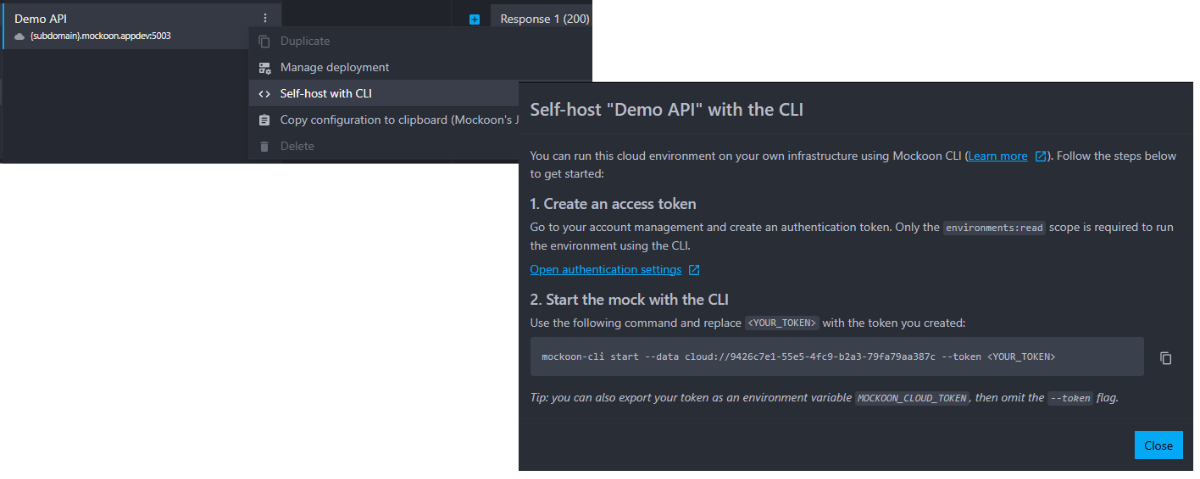
You will be able to pull the environment using the mockoon-cli start command and by providing an access token and the Cloud environment identifier. Access tokens can be created from your account settings.
More information about this new feature can be found in the documentation.
Two modifications were made to the CLI to support this feature:
- the
--dataflag now accepts Cloud environment identifierscloud://{uuid}to differentiate them from local environment files. - a new
--tokenflag was added to provide the access token needed to pull Cloud environments.
(Issue #1736)
Callbacks now support relative URLs
To make it easier to call endpoints within the same mock, relative URLs are now supported in callbacks:
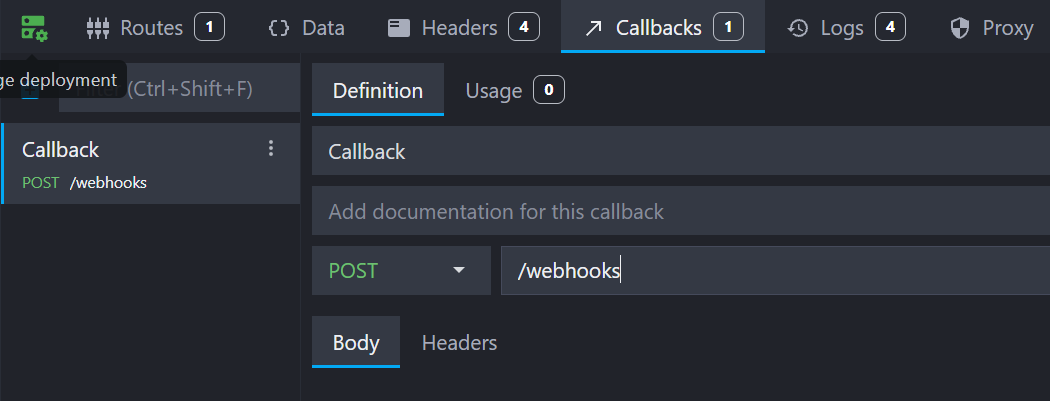
The relative URL will be constructed using the mock's hostname and port, for example: /test-callback will be called as http://localhost:3000/test-callback if the mock is running on localhost:3000.
When using the CLI or Docker image you can customize the base URL using the --public-base-url flag (e.g. mockoon-cli start ... --public-base-url=https://my-mock.example.org). On Mockoon Cloud, the base URL will always be the unique URL assigned to your cloud instance.
(Issue #1730)
Copy curl command from the logs tab
You can now copy a curl command from the logs tab to easily reproduce requests made to your mock APIs. Select "Copy as curl" from the log entry context menu to copy the command to your clipboard:
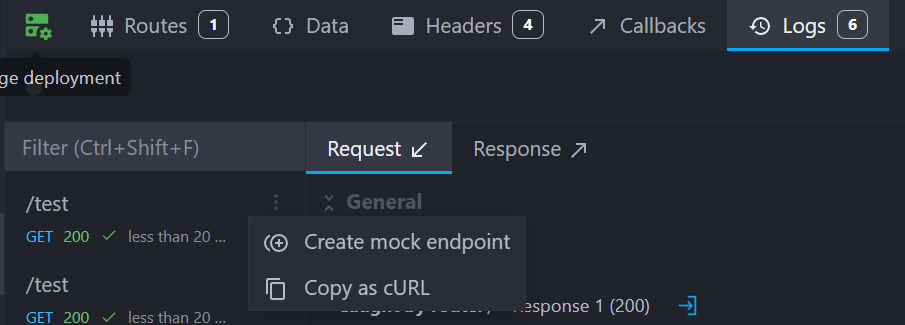
The generated command includes the request method, URL, headers and body, for example:
Copycurl --location --compressed --request GET "https://mock-1234.mockoon.app/test" --header "host: mock-1234.mockoon.app" --header "user-agent: Mozilla/5.0 (Windows NT 10.0; Win64; x64) AppleWebKit/537.36 (KHTML, like Gecko) Chrome/143.0.0.0 Safari/537.36"
(Issue #1458)
Improvements
- The
baseUrltemplating helper will use the--public-base-urlflag value when running with the CLI or Docker image to generate URLs consistent with the mock's public URL. (Issue #1488) - We optimized the OpenAPI parser when importing large OpenAPI files to reduce memory consumption and speed up the import process. (Issue #1994)
- The OpenAPI parser now correctly imports endpoints with dashes in their path parameters (e.g.
/users/{user-id}). (Issue #2012) - When importing an OpenAPI endpoint with an
application/problem+jsonexample response body is now created. (Issue #2009)
Fixes
- The application does not show non-existing tabs when navigating between routes of different types (HTTP, WebSocket, etc.). (Issue #1893)
- The UI correctly displays the port in the environment menu and settings when a hostname is set. (Issue #1910)
- Fixed telemetry not being sent for unauthenticated users. (Issue #1965)
- The cloud logs are now replayed in the correct order, from most recent to oldest. (Issue #1966)
- Resizing menus cannot trigger items drag and drop anymore. (Issue #1964)
- When redeploying a Cloud environment, the region selection dropdown is now correctly set to the current region. (Issue #1982)
Chores
- We updated the libraries and applications dependencies to their latest versions to fix several vulnerabilities.
Thank you
A big thank you to the following people who helped to make Mockoon better: