Mockoon Pro is now generally available
Mockoon Pro leaves beta with workspace access rights for multiple teams, mixed authentication, automatic migrations, and stronger administration controls.

Earlier this month, we launched the public beta of Mockoon Pro, our self-hosted platform bringing real-time collaboration, remote mock API deployments, and an embedded web application to your own infrastructure.
Following feedback from teams testing it across various environments and enterprise setups, Mockoon Pro is now generally available alongside Mockoon v9.10.0.
You can start a free 14-day trial today using your work email. No account or payment method is required.
What is Mockoon Pro?
Mockoon Pro packages a complete, team-wide mock API platform into a single lightweight Docker container with zero external database dependencies. It is designed to run on your own private cloud, on-premises servers, or air-gapped networks:
- Real-time collaboration and data synchronization across the desktop and embedded web applications.
- API mock deployment and orchestration on your own network with automatic subdomain routing.
- Embedded web application to design, inspect, and deploy mock APIs directly from a browser.
- Completely offline operation with zero telemetry, phoning home, or external API calls.
You can explore all capabilities in the Mockoon Pro documentation or follow the installation guide to deploy it.
What's new in the general availability release
Along with general availability, version 9.10.0 introduces several key features to help organizations manage multiple teams, streamline authentication, and simplify upgrades.
Workspaces and team access rights
Organizations often host multiple teams or projects on a single Mockoon Pro instance while needing strict separation between their resources. Mockoon Pro now includes workspaces to organize remote mock APIs and control which team members can access them.
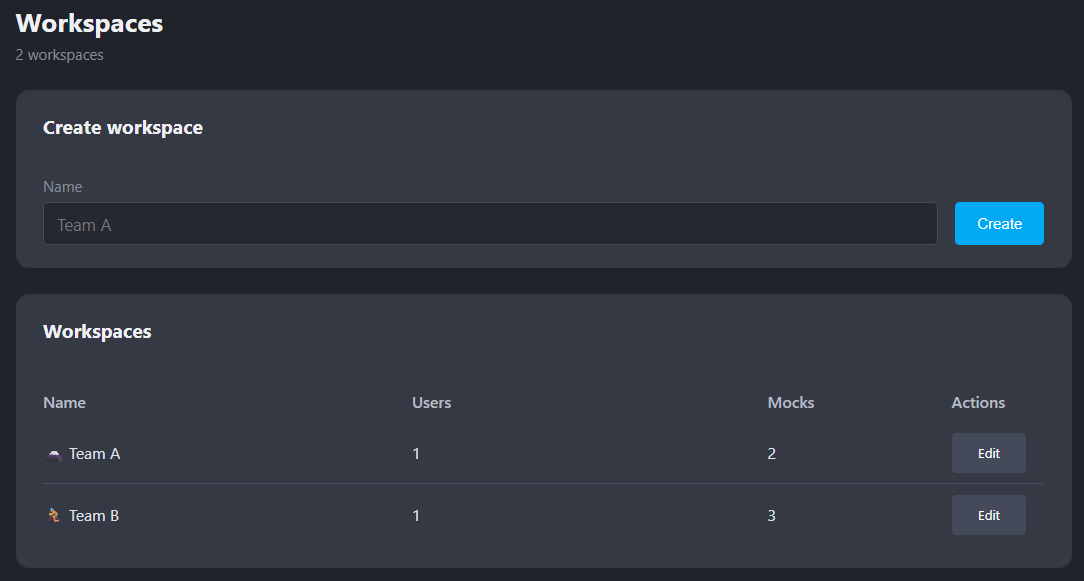
Instance Owners can create workspaces and assign users to one or more of them:
- Each remote environment belongs to a single workspace, while users can belong to multiple workspaces.
- Users only see, edit, synchronize, and deploy environments from the workspaces they are assigned to.
- Real-time updates, presence indicators, and mock deployments are isolated per workspace.
- Users with multiple workspaces can filter their Remote environments list and choose the target workspace when creating new remote environments.
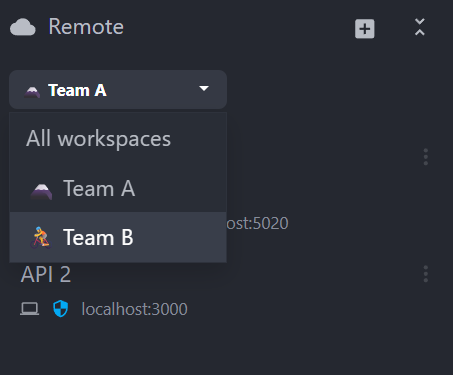
Existing Mockoon Pro beta installations are migrated automatically on startup: a Default workspace is created once, and all existing remote environments and non-Owner users are assigned to it. Learn more in the workspaces and team access documentation.
Mixed authentication mode (Local + OIDC SSO)
During the beta, instances had to choose between local database accounts or OpenID Connect (OIDC) Single Sign-On. Mockoon Pro now supports a mixed authentication mode, enabling local username/password accounts and OIDC SSO at the same time.
This allows organizations to progressively roll out enterprise SSO while keeping local password access for specific users, contractors, or administrators. When an existing local user signs in through OIDC with a matching verified email, their account is automatically linked and OIDC supersedes password authentication for that account. Learn more in the authentication documentation.
User role management and expanded audit trail
Administration controls have been expanded to make day-to-day team management easier:
- Role management: Owners can now promote Users to Owners or demote Owners back to Users directly from the administration portal, with built-in safeguards preventing self-demotion or removing the last Owner.
- Settings audit logging: Changes made to instance settings—alongside workspace creation, renames, membership updates, and role changes—are now tracked in the audit trail.
Automatic major-version migrations
To make upgrades predictable and low-maintenance, Mockoon Pro now performs automatic synchronized-environment migrations during major-version upgrades. When a newer major server version starts, all persisted remote environments are migrated centrally before clients connect, without requiring a user to open the desktop or web client first. Learn more in the migrations documentation.
Streamlined desktop and web client experience
The desktop and embedded web applications have also been refined for Mockoon Pro in v9.10.0:
- Clearer terminology: Synchronized environments are now consistently labeled Remote (with Local and Remote lists on desktop, and a unified APIs list in the web app), and the connection flow now uses Connect to clearly distinguish between connecting to a private Mockoon Pro instance and signing into legacy Mockoon Cloud.
- Refreshed notifications: Application toasts feature a cleaner, modern design and now support an Undo action to quickly restore deleted routes, folders, responses, data buckets, and callbacks.
Try Mockoon Pro
Mockoon Pro is available now. Eligible companies can request a free 14-day trial with five license slots using a verified work email. The trial does not require an account or payment method and does not renew automatically.
Start your free Mockoon Pro trial or contact our team if you need a larger evaluation, migration assistance from Mockoon Cloud, or have specific security and compliance questions.
You might also be interested in these articles
Contributor spotlight: Rohan Akode
We continue our series of interviews with Mockoon's open-source contributors with Rohan Akode.
Read more2026 retrospective and Mockoon 9th birthday
Let's look back at 2026 and celebrate Mockoon's 9th birthday!
Read moreMockoon Pro self-hosted is now available in beta
Mockoon Pro is now available in beta, bringing real-time collaboration, mock API deployments, and the web app to your own infrastructure.
Read more